Claude Docs + Slides + Design: Turn One Brief into a Complete Business Content System
How to create a living document, leadership deck and on-brand visual from one Claude conversation—without losing context or skipping production QA.
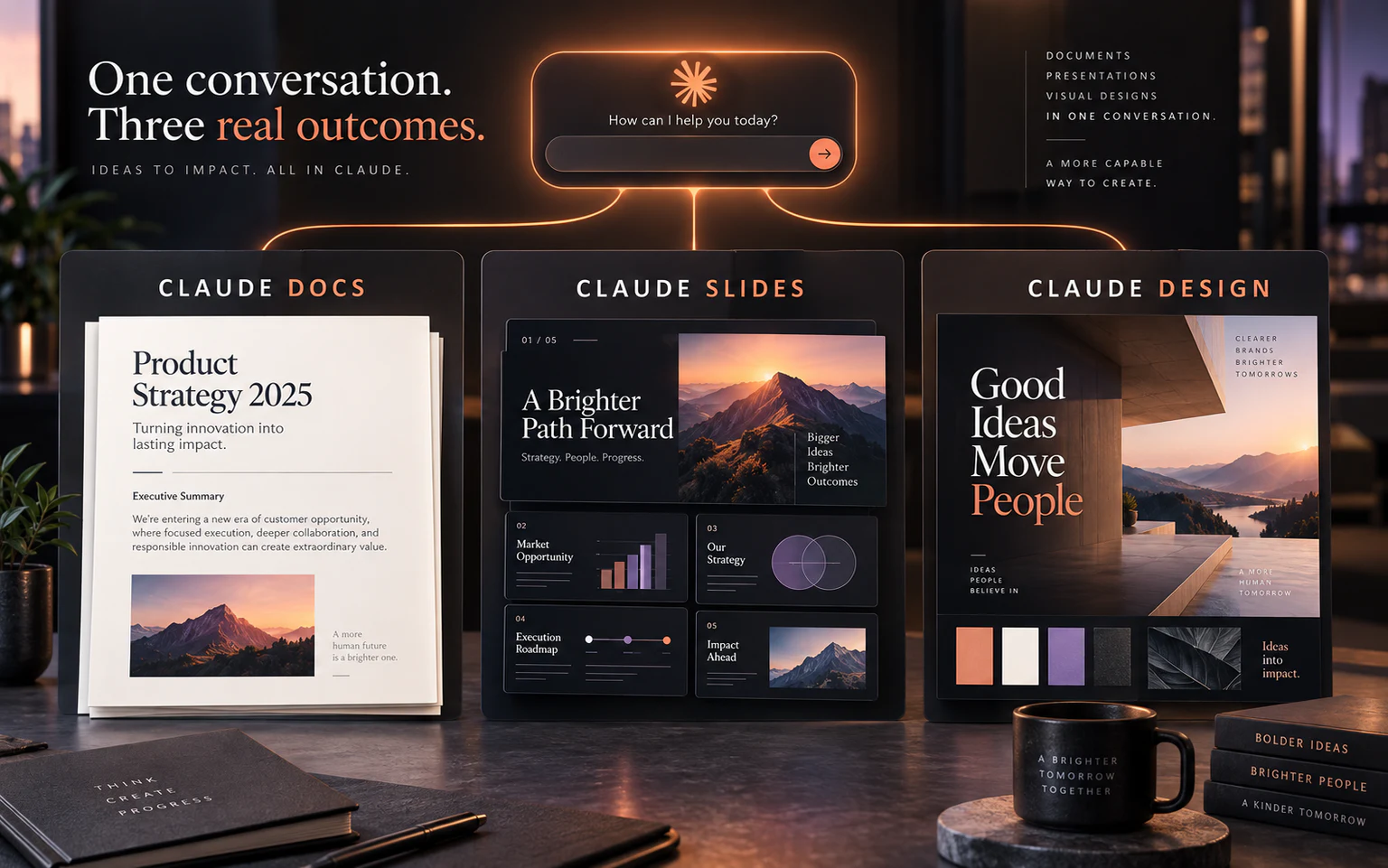
Claude Docs, Slides and Design in one conversation
Watch the original post and video on X
Claude Docs, Claude Slides and Claude Design let a team start with one approved brief and produce a living document, a presentation and branded visual output in the same conversation. Shared context reduces drift between files, but the team still needs to verify facts, numbers, confidential data, rights, branding and exports before publishing or sharing.
- Use one source brief and make the document the source of truth for slides and design
- Docs handles substance, Slides handles decision narrative, and Design handles the visual system
- Keeping revisions in one conversation reduces conflicting claims across deliverables
- Add QA gates for facts, brand, legal, accessibility and export
- Schedule recurring work only after sources, owners and acceptance criteria are stable
What changed: one Claude instead of separate work modes
Anthropic announced that Claude Cowork and chat are becoming one experience, alongside Claude Docs, Claude Slides and Claude Design inside conversations. Claude can choose the capabilities a task needs instead of forcing the user to move context between workspaces.
In Anthropic's example, a team asks for a pipeline report and then turns the same source into five leadership slides. Users can edit, comment, share, present and export to PowerPoint or PDF without rebuilding the narrative elsewhere.
Three tools, three responsibilities
For control, make the approved Doc the content source of truth. Let Slides compress and sequence it, then let Design work from only the final copy. This reduces the risk of three deliverables telling three different stories.
- Claude Docs: living documents such as one-pagers, proposals, reports and SOPs
- Claude Slides: a decision-focused narrative that can be edited, presented and exported
- Claude Design: visual direction, layouts and assets aligned to a design system
A one-brief production workflow
- Attach real source material, meeting notes, metrics, brand guidance and approved examples
- Define the audience, required decision and confidentiality constraints
- Ask Claude to produce a source map and missing-information questions
- Build the master Claude Doc with facts, citations and assumptions
- Approve the message hierarchy before generating Claude Slides
- Create visuals in Claude Design only after final copy is approved
- Review at the source, synchronize changes and then export or share
Four high-value business use cases
These jobs are valuable because one content core must ship in multiple formats. Measure time from source intake to final approval—not simply the number of files generated.
- Weekly business review: report plus five leadership slides
- Sales proposal: discovery notes into proposal, pitch deck and visual concept
- Corporate training: facilitator guide, participant deck and supporting visuals
- Campaign launch: strategy brief, stakeholder deck and key-visual direction
QA before anything leaves the team
- Facts: confirm every number, name, date and citation
- Message: confirm one approved claim and CTA across all outputs
- Brand: inspect typography, color, logo, tone and image style
- Legal: review confidential data, rights and regulated claims
- Accessibility: inspect readability, contrast and alternative text
- Export: open the PowerPoint/PDF and test fonts, links and media
From one-off production to a scheduled workflow
Anthropic's launch example includes scheduling the report every Monday. Automate only after sources, format, ownership and approvals are stable. Start by generating a draft and notifying the reviewer rather than publishing autonomously.
Store the template, skill, connectors, schedule and QA checklist together so the process is transferable and does not depend on the original builder's memory.
Build this around your team's real work
Our ChatGPT Work × Claude Cowork workshop teaches task decomposition, skills, connectors, documents, slides, schedules and human approval. Teams can begin with Google Sheets, Docs, Slides, Drive and recurring office work—without first building a web app.
The goal is not more generated files. It is a repeatable operating workflow that ships consistent, reviewable work every day or week.
Explore the ChatGPT Work × Claude Cowork workshopFrequently asked questions
What is Claude Docs?
It is a collaborative living-document experience inside Claude for reports, one-pagers, proposals and documents that require multiple revision rounds.
Can Claude Slides export PowerPoint?
Anthropic says users can edit, present and download work as PowerPoint or PDF. Inspect fonts and layout after export.
Can Claude Design use a design system?
Anthropic's release notes describe importing a design system, but the team should still verify colors, type, logos and asset rights.
Which plans include the features?
Availability has been rolling out and can depend on the plan and enterprise-admin settings. Check the current release notes and the actual account.
Can it create a weekly report automatically?
Yes where scheduling is available, but use clear sources, ownership and approvals. Begin with a draft-and-review workflow before automatic sharing.
Sources
- [1] Claude Cowork and chat are now one Claude — Claude by Anthropic · accessed 2026-09-28
- [2] Claude release notes — September 16, 2026 — Claude Help Center · accessed 2026-09-28
- [3] Claude Docs, Slides and Design announcement — Claude on X · accessed 2026-09-28